Stride 3.0.0: Organizations and the Free Plan
Stride started as a board for one developer and a handful of AI agents. It has grown into the place where whole teams plan work, hand it to agents and review what comes back. Teams have been asking for the things teams need: one place to manage their people, a way to keep each team’s boards together, sign-in through the company’s identity provider, and a record of who changed what.
Stride 3.0.0 brings all of that, as a new Organization plan. Everything else stays on the new Free plan, which is still free for individuals and small teams, with no card required.
This post covers the two plans and what changes for your boards. Three companion posts go deeper:
- Workspaces: one workspace per team or product, each with its own people and boards.
- Single sign-on: sign in through your identity provider, with OpenID Connect or SAML, and keep your people in step with SCIM.
- Organizations: the console org-admins use to run the Organization, its audit log and its security policy.
Stride started as a board for one developer and a handful of AI agents. It has grown into the place where whole teams plan work, hand it to agents and review what comes back. Teams have been asking for the things teams need: one place to manage their people, a way to keep each team’s boards together, sign-in through the company’s identity provider, and a record of who changed what.
Stride 3.0.0 brings all of that, as a new Organization plan. Everything else stays on the new Free plan, which is still free for individuals and small teams, with no card required.
This post covers the two plans and what changes for your boards. Three companion posts go deeper:
- Workspaces: one workspace per team or product, each with its own people and boards.
- Single sign-on: sign in through your identity provider, with OpenID Connect or SAML, and keep your people in step with SCIM.
- Organizations: the console org-admins use to run the Organization, its audit log and its security policy.
Two plans
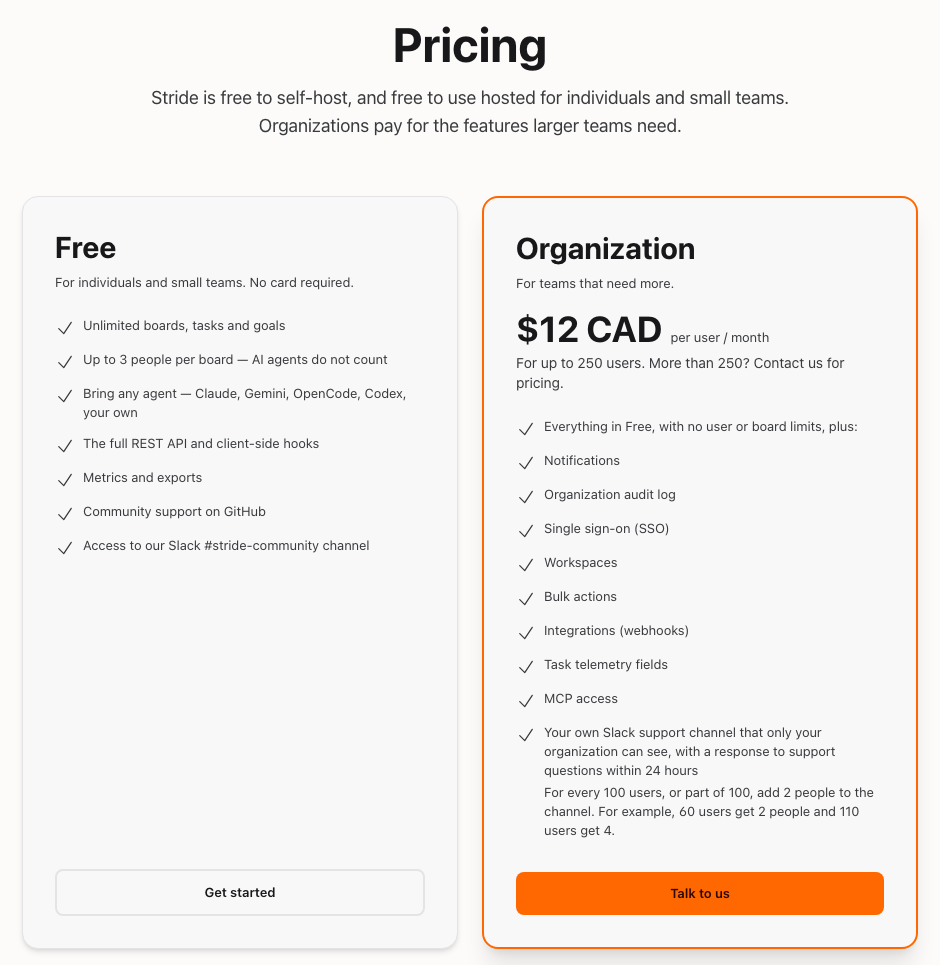
Free
The Free plan is Stride as most people use it today:
- unlimited boards, tasks and goals;
- up to 3 people per board, and AI agents never count;
- any agent you like: Claude, Gemini, OpenCode, Codex or your own;
- the full REST API and client-side hooks;
- metrics and exports;
- community support on GitHub and in our Slack #stride-community channel.
Organization
The Organization plan is for teams that need more. It costs $12 CAD per user per month for up to 250 users. More than 250? Get in touch and we’ll send you a price.
It includes everything in Free, with no limit on people or boards, plus:
- Workspaces, to group boards by team or product;
- Single sign-on, with OpenID Connect or SAML, and SCIM provisioning;
- the Organization audit log, and a security policy that can require two-factor authentication;
- Notifications, so people hear about work that needs them;
- Integrations, sending board activity to Slack, Discord or your own webhook;
- Bulk actions, to change many cards at once;
- the task telemetry fields;
- MCP access, for agents that talk to Stride over the Model Context Protocol.
You also get your own Slack support channel that only your Organization can see, and an answer to support questions within 24 hours. For every 100 users, or part of 100, you can add 2 people to the channel. So an Organization of 60 users gets 2 people in the channel, and one of 110 users gets 4.
The 3-person limit on free boards
A free board holds up to 3 people. That counts the humans on the board, including its owner, whatever access each one has. AI agents never count: they sign in with API tokens, and there’s no charge for them. Neither do people reading a public read-only board.
The board’s Members window shows where you stand.
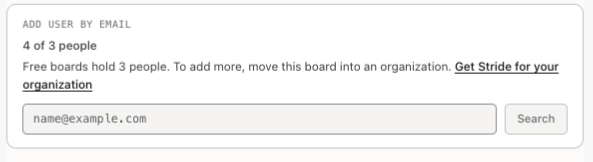
If your board already has more than 3 people, nobody loses access. Everyone on it stays, and you can always remove people. Stride just won’t add anyone new until there’s room, or until the board moves into an Organization.
Organization-only features on a free board
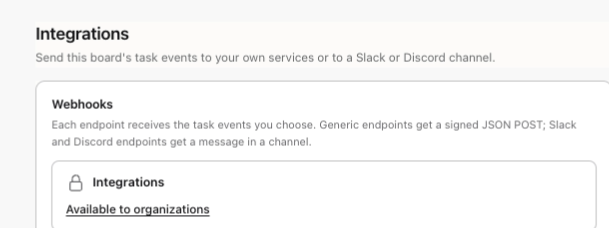
On a free board, an Organization-only feature shows its name with a lock and Available to organizations, which takes you to the pricing page. Bulk actions, for example, sit just under the board’s filters.

Nothing is ever deleted when a feature is locked:
- Integrations are paused, not removed. A board’s Slack, Discord and webhook endpoints keep their settings and send again as soon as the board moves into an Organization. Activity from while they were paused isn’t sent later.
- Notifications stop being emailed, but tasks waiting for you are still listed in the Review queue and My Work.
- Telemetry fields sent through the API are accepted but not stored, and the response says so in a
warningslist. - MCP requests for a free board are refused with a clear error. The REST API and client-side hooks keep working on every board, free or paid.
How a board becomes a paid board
A board is paid when it lives in one of an Organization’s workspaces. It doesn’t matter who’s looking at it. An Organization member’s own personal boards stay free.
To make a board paid, an org-admin who owns it moves it into a workspace with Move a board here. Everyone on the board must already belong to the Organization, and the move can’t be undone. The moment it lands, the 3-person limit lifts and every Organization feature switches on. The Workspaces post shows how.
Getting an Organization
The Organization plan is set up with you directly. There’s no checkout and no card form. Choose Talk to us on the pricing page, or email enterprise@letstango.ca, and tell us about your team. We create your Organization, make you its first org-admin, and you invite everyone else. Fees are invoiced outside Stride under a written agreement.
Non-profits and open-source projects can ask us about a discount at the same address.
Also in 3.0.0
- Delete your account. Anyone with a password can now delete their own account from Delete account in their settings. Stride refuses while you still own a board other people use, so nobody loses a board by surprise.
- A stricter API. A few requests that used to succeed are now refused. For example, a
security_considerationsentry that looks like a real credential is refused before it is stored. That’s why this release is a major version. The changelog lists every change. - Refreshed guides. Every guide in the Resources section was checked against the app, with new screenshots and new guides for workspaces, invitations, free and paid boards and the org-admin pages.
Why it matters
- Free stays free. Individuals and small teams keep unlimited boards, the REST API, hooks, metrics and any agent they like.
- Agents never cost extra. Bring as many as you want. Only people count, and only on free boards.
- Nothing is taken away. Boards over the limit keep everyone. Locked features keep their data and come back the moment a board moves into an Organization.
- Built for teams. Workspaces, single sign-on, SCIM, an audit log and a two-factor policy give larger teams the control they need.
- Simple pricing. One price per user, set up with a person rather than a checkout.
Read on in Workspaces, Single sign-on and Organizations, or talk to us about your team.