Building a LiveView app using AI - Part 12
Adding users to boards and tasks
Since the announcement of Claude Code running inside of Tidewave I have been extremely happy about this combo. For now I am using it for nearly all of my changes to the codebase. I have even given it a name - ClaudeWave. All of the changes in this post were done using ClaudeWave.
So far our boards only have an owner. I want an owner to have the ability to add other users to a board and also assign tasks to one of those users. Let’s get started.
Fixing the relationships
Currently the database structure for the application has a one to many relationship between users and boards. A board has an owner and a user can have many boards. All of the queries use this relationship. I need to change this relationship to a many to many relationship. I also want the relationship to store the user’s role on the board. Valid values should be Owner, ReadOnly, and Modify which are the permissions they will have on the board.
I asked ClaudeWave to do this and before you know it this was done. Next I asked ClaudeWave to make sure the “My Boards” link on the top of the page works for all types of users - if you are ReadOnly you should still be able to see it on your boards page. ClaudeWave reported that it works. The final thing I asked ClaudeWave to do is to add an icon to a Board card to identify a users role for that board. Here’s what it looks like:
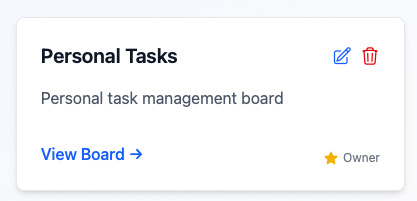
Now that the relationship and queries are updated to allow multiple users for a board it is time to actually implement the ability to add users to a board.
Adding users to a board
To start I asked ClaudeWave to create a few users that I can use to test this feature we are about to add. A few seconds later and I was ready to start adding the UI for this feature.
I was not happy with the fact that ClaudeWave added a new form with a different style than the rest of the application. After I spent some time testing the changes I asked it to update my AGENTS.md file to make sure it is following the same style as the rest of the application. Here is what it added:
### UI/UX guidelines

- **Always follow existing application styles and patterns** when adding new UI elements
- Before creating custom styles, check `core_components.ex` for existing components like `<.input>`, `<.button>`, `<.form>`, etc.
- When adding form fields, use the standard component structure with `fieldset`, `label`, and `span.label` classes to match existing forms
- New buttons should use the `<.button>` component without custom classes unless specifically requested
- Maintain consistency with existing color schemes, spacing, and typography throughout the application
After testing everything I asked ClaudeWave to add a message to let users know that they had to be registered and this is the final result:
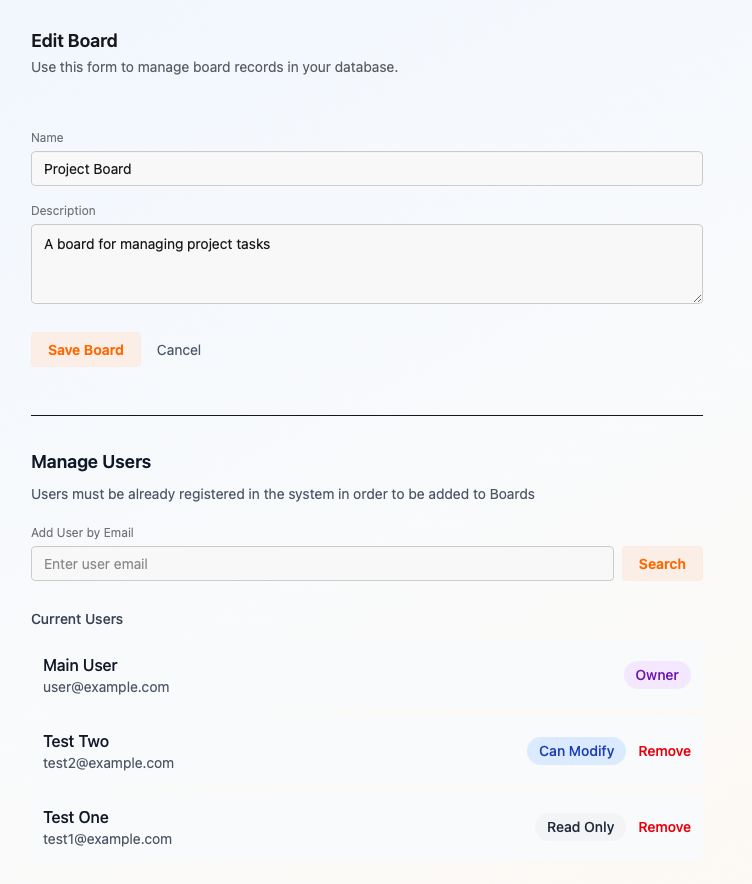
Adding users to tasks
For our next task we ask TideWave to update the task form to allow us to assign a user to a task. We also ask TideWave to add a person icon to the tasks so you can see if one is assigned.
I will not include a picture here as I review the changes in the video and you can see everything there.
One final thing
If you add a new column to a board it always adds the column to the end of the board. I asked TideWave to add the ability to drag and drop columns so I can reorder them as I wish. It was an easy task for TideWave.